> ## Documentation Index
> Fetch the complete documentation index at: https://docs.tinykit.studio/llms.txt
> Use this file to discover all available pages before exploring further.
# Database
> Store and manage data with Pocketbase
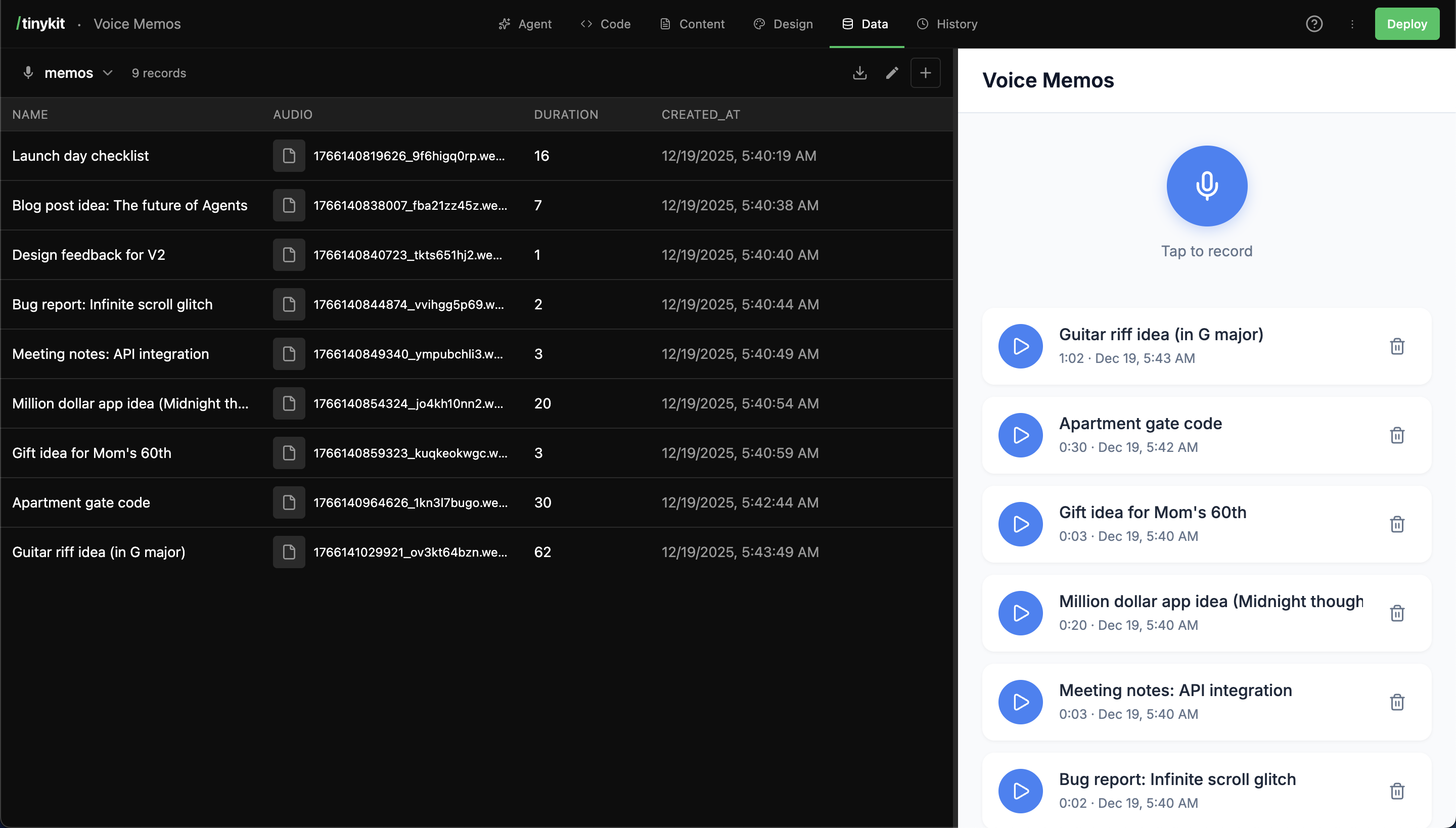
tinykit uses **Pocketbase**, an embedded SQLite database that runs alongside your app. Create collections, store records, and get realtime updates—all without setting up external infrastructure.
 ## How It Works
1. The AI (or you) creates a **collection** (like a database table)
2. Collections store **records** (rows of data)
3. Your code accesses data via `import data from '$data'`
4. Changes sync in realtime across all connected clients
5. The **Data tab** lets you browse and edit records visually
***
## Data Tab Overview
The Data tab shows all your collections:
## How It Works
1. The AI (or you) creates a **collection** (like a database table)
2. Collections store **records** (rows of data)
3. Your code accesses data via `import data from '$data'`
4. Changes sync in realtime across all connected clients
5. The **Data tab** lets you browse and edit records visually
***
## Data Tab Overview
The Data tab shows all your collections:
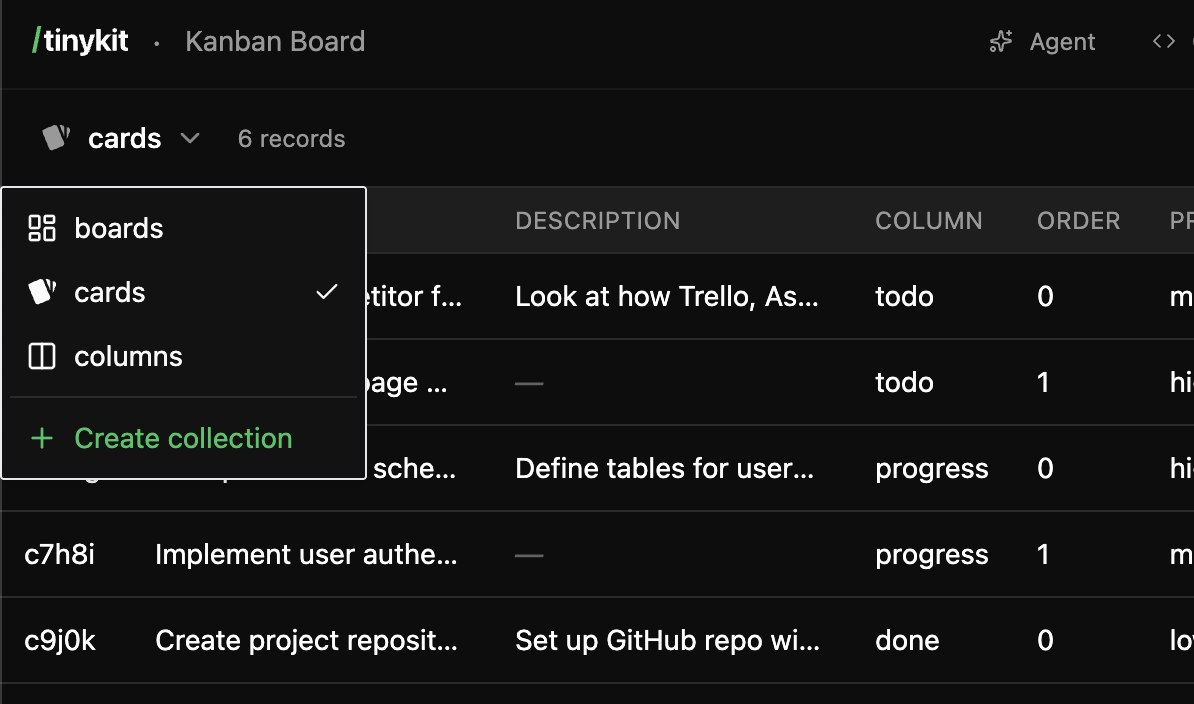 **Features:**
* View all collections on the left
* Browse records for selected collection
* Add, edit, and delete records
* Create new collections with custom schemas
* Export data as JSON
***
## Accessing Data in Code
### Import and Subscribe
```svelte theme={null}
```
### CRUD Operations
```javascript theme={null}
// Create a new record
await data.todos.create({
title: 'Buy groceries',
completed: false
})
// Update a record by ID
await data.todos.update('abc123', {
completed: true
})
// Delete a record by ID
await data.todos.delete('abc123')
```
All operations trigger realtime updates automatically.
***
## Column Types
When creating collections, choose appropriate column types:
| Type | Description | Example Values |
| ----------- | --------------------- | -------------------------- |
| **text** | Any string | `"Hello"`, `"abc123"` |
| **number** | Numeric values | `42`, `3.14`, `-10` |
| **boolean** | True/false | `true`, `false` |
| **date** | Date/time | `"2024-01-15T10:30:00"` |
| **file** | Single file upload | `"document.pdf"` |
| **files** | Multiple file uploads | `["img1.png", "img2.png"]` |
| **json** | Structured data | `{"key": "value"}` |
### Schema Inference
If you create records without defining a schema, tinykit infers types from the first record:
```javascript theme={null}
// Schema auto-inferred as: title (text), count (number), active (boolean)
await data.items.create({
title: 'Example',
count: 42,
active: true
})
```
***
## Creating Collections
### Via the AI
Ask the AI to create collections:
```
Store recipes with a title, ingredients list, and instructions
```
The AI will:
1. Create a `recipes` collection
2. Define the schema (title, ingredients, instructions)
3. Wire up the code to use the collection
### Via the Data Tab
1. Click **Add Collection**
2. Enter a name (lowercase, underscores allowed)
3. Add columns with names and types
4. Click **Create**
### Via Code
If you reference a collection that doesn't exist, you can create it by adding the first record:
```javascript theme={null}
// Creates 'notes' collection with inferred schema
await data.notes.create({
title: 'First Note',
content: 'Hello world',
created_at: new Date().toISOString()
})
```
***
## Common Patterns
### Loading State
Always show loading indicators:
```svelte theme={null}
{#if loading}
**Features:**
* View all collections on the left
* Browse records for selected collection
* Add, edit, and delete records
* Create new collections with custom schemas
* Export data as JSON
***
## Accessing Data in Code
### Import and Subscribe
```svelte theme={null}
```
### CRUD Operations
```javascript theme={null}
// Create a new record
await data.todos.create({
title: 'Buy groceries',
completed: false
})
// Update a record by ID
await data.todos.update('abc123', {
completed: true
})
// Delete a record by ID
await data.todos.delete('abc123')
```
All operations trigger realtime updates automatically.
***
## Column Types
When creating collections, choose appropriate column types:
| Type | Description | Example Values |
| ----------- | --------------------- | -------------------------- |
| **text** | Any string | `"Hello"`, `"abc123"` |
| **number** | Numeric values | `42`, `3.14`, `-10` |
| **boolean** | True/false | `true`, `false` |
| **date** | Date/time | `"2024-01-15T10:30:00"` |
| **file** | Single file upload | `"document.pdf"` |
| **files** | Multiple file uploads | `["img1.png", "img2.png"]` |
| **json** | Structured data | `{"key": "value"}` |
### Schema Inference
If you create records without defining a schema, tinykit infers types from the first record:
```javascript theme={null}
// Schema auto-inferred as: title (text), count (number), active (boolean)
await data.items.create({
title: 'Example',
count: 42,
active: true
})
```
***
## Creating Collections
### Via the AI
Ask the AI to create collections:
```
Store recipes with a title, ingredients list, and instructions
```
The AI will:
1. Create a `recipes` collection
2. Define the schema (title, ingredients, instructions)
3. Wire up the code to use the collection
### Via the Data Tab
1. Click **Add Collection**
2. Enter a name (lowercase, underscores allowed)
3. Add columns with names and types
4. Click **Create**
### Via Code
If you reference a collection that doesn't exist, you can create it by adding the first record:
```javascript theme={null}
// Creates 'notes' collection with inferred schema
await data.notes.create({
title: 'First Note',
content: 'Hello world',
created_at: new Date().toISOString()
})
```
***
## Common Patterns
### Loading State
Always show loading indicators:
```svelte theme={null}
{#if loading}
Loading...
{:else if items.length === 0}
No items yet
{:else}
{#each items as item (item.id)}
{item.name}
{/each}
{/if}
```
### Filtering Data
Use `$derived.by()` for filtered views:
```svelte theme={null}
```
### Sorting Data
Copy arrays before sorting (sort mutates):
```svelte theme={null}
```
### Form Submission
```svelte theme={null}
```
### Optimistic Updates
For snappier UI, update state before the server responds:
```svelte theme={null}
```
***
## Record IDs
Every record has a unique `id` field:
* Auto-generated if not provided (5 alphanumeric characters)
* Can be manually set when creating records
* Used for updates and deletes
```javascript theme={null}
// Auto-generated ID
await data.items.create({ name: 'Test' })
// → { id: 'x7k2m', name: 'Test' }
// Manual ID
await data.items.create({ id: 'custom', name: 'Test' })
// → { id: 'custom', name: 'Test' }
```
***
## Timestamps
Records include automatic timestamps:
| Field | Description |
| --------- | --------------------------------- |
| `created` | When the record was created |
| `updated` | When the record was last modified |
```svelte theme={null}
{#each items as item (item.id)}
{item.name}
Created: {new Date(item.created).toLocaleDateString()}
{/each}
```
***
## Pocketbase Admin
For advanced database management, access Pocketbase directly:
```
yourapp.com/_pb/_
```
The Pocketbase admin UI lets you:
* Browse all collections
* Run SQL queries
* Manage authentication
* Configure collection rules
* Export/import data
tinykit stores app data in the `_tk_projects` collection. Your app's collections are stored within each project's `data` field.
***
## Data Export
### From the Data Tab
1. Select a collection
2. Click the download icon
3. Get JSON export of all records
### From Pocketbase Admin
Access `/_pb/_` for full database export capabilities.
***
## Limitations
Keep these limitations in mind:
**No relations (yet)**: Collections are independent. For related data, store IDs manually:
```javascript theme={null}
// Store author_id instead of nested author object
await data.posts.create({
title: 'My Post',
author_id: 'usr123'
})
```
**Shared database**: All apps on a tinykit instance share the same Pocketbase. Use unique collection names or prefixes:
```
recipes_items (recipes app)
blog_posts (blog app)
crm_contacts (crm app)
```
**No migrations**: Schema changes should be made carefully. Adding fields is safe; removing or renaming requires manual data migration.
***
## FAQ
Data is stored in Pocketbase's SQLite database at `pocketbase/pb_data/`. This persists across app restarts.
Yes. The SQLite database is a single file. Copy `pocketbase/pb_data/data.db` for a full backup. You can also export via the Pocketbase admin UI.
SQLite handles millions of records efficiently. For very large datasets, consider pagination in your queries.
Access the Pocketbase admin at `/_pb/_` to run SQL queries directly.
In the Data tab, select the collection and click the delete button. This removes all records permanently.
Last write wins. Pocketbase doesn't have conflict resolution—the most recent update overwrites previous values.