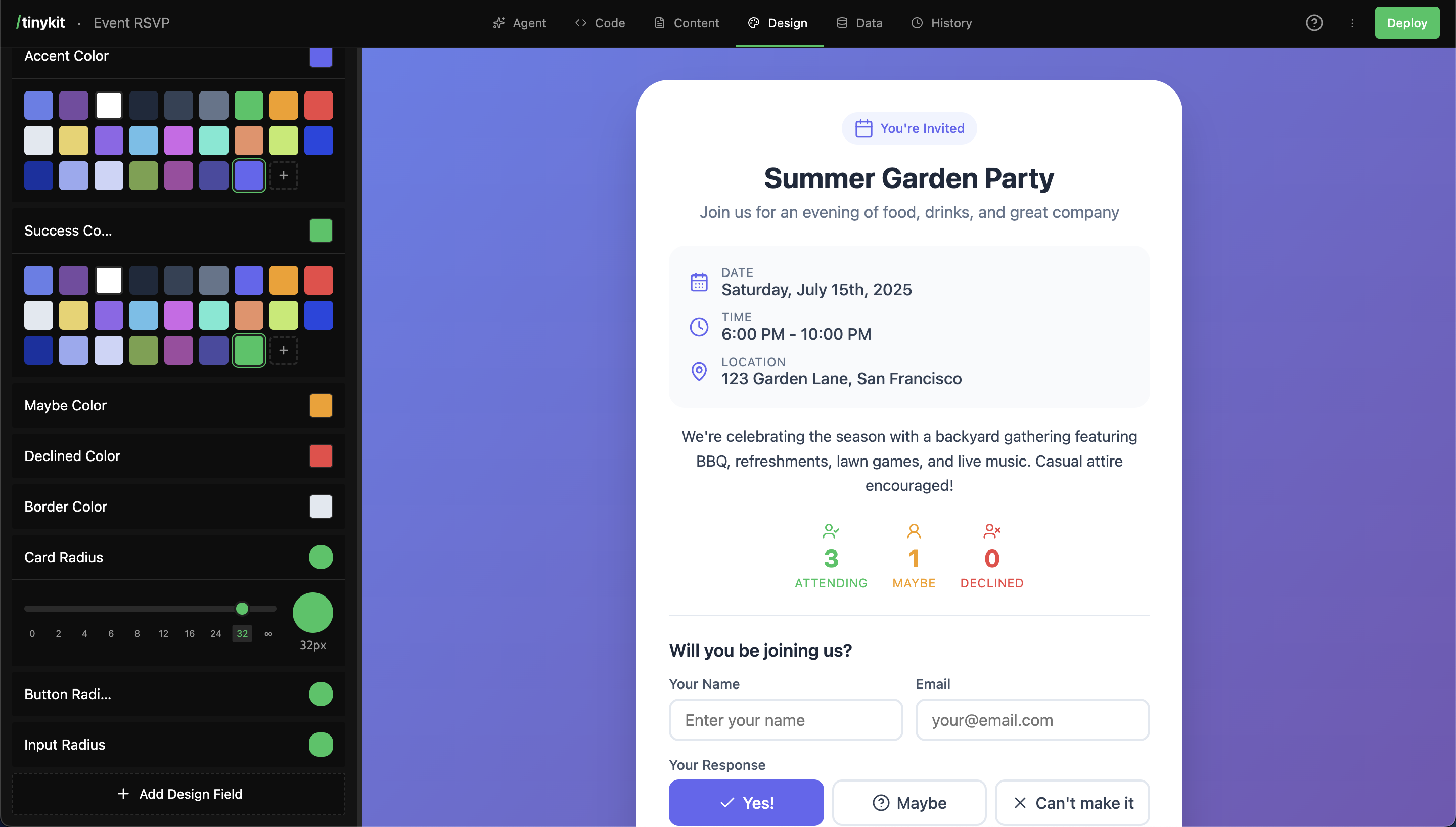
Design fields are CSS variables that control your app’s appearance. Colors, fonts, spacing, shadows—all adjustable with visual editors, no code required.

How It Works

  1. The AI (or you) creates a design field with a name and value
  2. The field gets a CSS variable (e.g., --page-background)
  3. Your code uses the variable: background: var(--page-background)
  4. The Design tab shows visual editors for each field type
  5. Changes update the preview instantly
Design Tab                           Your CSS
┌─────────────────────┐              ┌─────────────────────┐
│ Page Background     │              │ .page {             │
│ ┌───┬───┬───┬───┐   │     →        │   background:       │
│ │ 🔵 │ 🔴 │ 🟢 │...│   │              │     var(--page-    │
│ └───┴───┴───┴───┘   │              │     background);    │
└─────────────────────┘              │ }                   │
                                     └─────────────────────┘

Field Types

Each type has a specialized visual editor:
TypeEditorExample Values
colorColor palette picker#3b82f6, #ffffff
sizeSlider (0-96px)16px, 24px
fontFont picker (1000+ fonts)Inter, Playfair Display
radiusRadius slider8px, 9999px (full)
shadowShadow presets0 4px 6px rgba(0,0,0,0.1)
textPlain text inputAny custom value

Using Design Fields

In Your CSS

Always include fallback values:
.card {
  background: var(--card-background, #ffffff);
  border-radius: var(--card-radius, 8px);
  box-shadow: var(--card-shadow, none);
}

.heading {
  font-family: var(--heading-font, sans-serif);
  color: var(--heading-color, #1a1a1a);
}

body {
  font-family: var(--body-font, system-ui, sans-serif);
  font-size: var(--body-font-size, 16px);
  background: var(--page-background, #f5f5f5);
}
Always use fallback values: var(--name, fallback). This ensures your app works even before design fields are created.

Name to CSS Variable

Field names are converted to kebab-case CSS variables:
Field NameCSS Variable
Page Background--page-background
Card Border Color--card-border-color
Button Hover Background--button-hover-background
Body Font--body-font

Color Fields

Color fields use a palette picker with:
  • Quick-select color chips
  • Full color picker
  • Hex input
  • Theme colors (other colors in your project)

Common Color Fields

/* Page colors */
--page-background: #f5f5f5;
--card-background: #ffffff;

/* Text colors */
--heading-color: #1a1a1a;
--body-text-color: #333333;
--secondary-text-color: #666666;
--muted-text-color: #999999;

/* UI colors */
--accent-color: #3b82f6;
--border-color: #e5e5e5;
--hover-background: #f0f0f0;

/* Semantic colors */
--success-color: #22c55e;
--warning-color: #f59e0b;
--danger-color: #ef4444;

Using Colors

.header {
  background: var(--header-background, #ffffff);
  border-bottom: 1px solid var(--border-color, #e5e5e5);
}

.button {
  background: var(--accent-color, #3b82f6);
  color: #ffffff;
}

.button:hover {
  background: var(--button-hover-background, #2563eb);
}

Font Fields

Font fields include a picker with 1000+ fonts from Bunny Fonts:
FontCategory
InterSans-serif
RobotoSans-serif
Open SansSans-serif
PoppinsSans-serif
MontserratSans-serif
Playfair DisplaySerif
MerriweatherSerif
JetBrains MonoMonospace
Source Code ProMonospace

Using Fonts

body {
  font-family: var(--body-font, system-ui, sans-serif);
}

h1, h2, h3 {
  font-family: var(--heading-font, var(--body-font, sans-serif));
}

code, pre {
  font-family: var(--code-font, ui-monospace, monospace);
}
Chain fallbacks for fonts: var(--heading-font, var(--body-font, sans-serif)) uses the body font if no heading font is set.

Size Fields

Size fields use a slider from 0-96px. Good for:
  • Font sizes
  • Spacing (padding, margins, gaps)
  • Icon sizes

Using Sizes

.container {
  padding: var(--container-padding, 24px);
  gap: var(--card-gap, 16px);
}

.heading {
  font-size: var(--heading-size, 32px);
}

.body {
  font-size: var(--body-size, 16px);
}

Radius Fields

Radius fields control border-radius with a visual slider:
  • 0px = square corners
  • 8px = subtle rounding
  • 16px = noticeable rounding
  • 9999px = fully rounded (pill/circle)

Using Radius

.card {
  border-radius: var(--card-radius, 8px);
}

.button {
  border-radius: var(--button-radius, 6px);
}

.avatar {
  border-radius: var(--avatar-radius, 9999px); /* circle */
}

.input {
  border-radius: var(--input-radius, 4px);
}

Shadow Fields

Shadow fields offer preset options:
PresetValue
Nonenone
SM0 1px 2px rgba(0,0,0,0.05)
MD0 4px 6px rgba(0,0,0,0.1)
LG0 10px 15px rgba(0,0,0,0.1)
XL0 20px 25px rgba(0,0,0,0.15)
Innerinset 0 2px 4px rgba(0,0,0,0.1)

Using Shadows

.card {
  box-shadow: var(--card-shadow, 0 1px 2px rgba(0,0,0,0.05));
}

.modal {
  box-shadow: var(--modal-shadow, 0 20px 25px rgba(0,0,0,0.15));
}

.input:focus {
  box-shadow: var(--focus-shadow, 0 0 0 3px rgba(59,130,246,0.3));
}

Creating Design Fields

Via the AI

The AI automatically creates design fields when building your app:
Create a card component with customizable colors and rounded corners
The AI will:
  1. Write CSS using variables with fallbacks
  2. Create design fields for each variable
  3. Fields appear in the Design tab

Via the Design Tab

  1. Click Add Design Field at the bottom
  2. Choose a type (color, size, font, etc.)
  3. Enter a name (e.g., “Card Background”)
  4. Set the initial value using the visual editor
  5. Click Add Field

Workflow: Design Then Code

If you create design fields first, then write CSS:
  1. Add “Card Background” as a color field, set to #ffffff
  2. The CSS variable --card-background is now available
  3. Use it in your CSS: background: var(--card-background, #ffffff)

Best Practices

Use Descriptive Names

Good

  • Card Background
  • Header Text Color
  • Button Hover Background
  • Container Padding

Avoid

  • Primary Color
  • Color 1
  • Background
  • Size

Consistent Naming Patterns

[component]-[property]

card-background
card-border-color
card-shadow
card-radius

button-background
button-hover-background
button-text-color
button-radius

Start Minimal

Don’t create every possible field upfront. Let the AI add fields as needed, or add them when you actually need customization. A simple app might have 5-10 design fields. A complex app might have 20-30.

Dark Mode Pattern

Create paired light/dark fields:
:root {
  --page-background: var(--light-page-background, #ffffff);
  --text-color: var(--light-text-color, #1a1a1a);
}

:root.dark {
  --page-background: var(--dark-page-background, #1a1a1a);
  --text-color: var(--dark-text-color, #f5f5f5);
}

Organizing Fields

Design fields appear in the order they’re created. Group related fields by creating them together:
1. Page Background
2. Card Background
3. Header Background
(backgrounds grouped)

4. Heading Color
5. Body Text Color
6. Secondary Text Color
(text colors grouped)

7. Accent Color
8. Border Color
(UI colors grouped)

FAQ

Yes! Click the pencil icon on any field to edit its name and type. The CSS variable will update automatically.
The CSS will fall back to the default value you specified: var(--deleted-field, fallback). Always use fallbacks.
Use the “Custom” (text) field type and enter any font-family value. You’ll need to ensure the font is loaded via a <link> tag or @font-face.
Reference one variable from another:
--button-background: var(--accent-color, #3b82f6);
--link-color: var(--accent-color, #3b82f6);
Yes, read CSS variables with:
const color = getComputedStyle(document.documentElement)
  .getPropertyValue('--accent-color')